How to implement WhatsApp sales automation without losing the customer
A buyer asking for a price should not become a 12-question form. Use this process to prepare a WhatsApp Business connection, teach the sales agent, qualify prospects and hand off the sale. It distinguishes the proposed sales playbook from features that require actual integration testing.
Follow these steps in order
Define one specific sales outcome
Pick one journey to automate first: a new property enquiry, quote request or product catalogue question. Write the end state as 'salesperson receives the requirement, budget, timeline and requested next action'. Avoid simultaneously promising appointment booking, automated broadcasts, payment collection and service support; those need different controls.
What to check: You can describe the outcome in one sentence and identify the employee who owns the next step.
Connect only the customer's authorized WhatsApp Business account
A business should use its own Meta-authorized number and approve the permissions required for messaging. Confirm the number, linked WhatsApp Business Account and message delivery. Never mix messages from different business tenants. Do not treat a dashboard connection badge as proof of a working incoming message.
What to check: From an external phone, send a fresh message and confirm it appears in the correct tenant's conversation history.
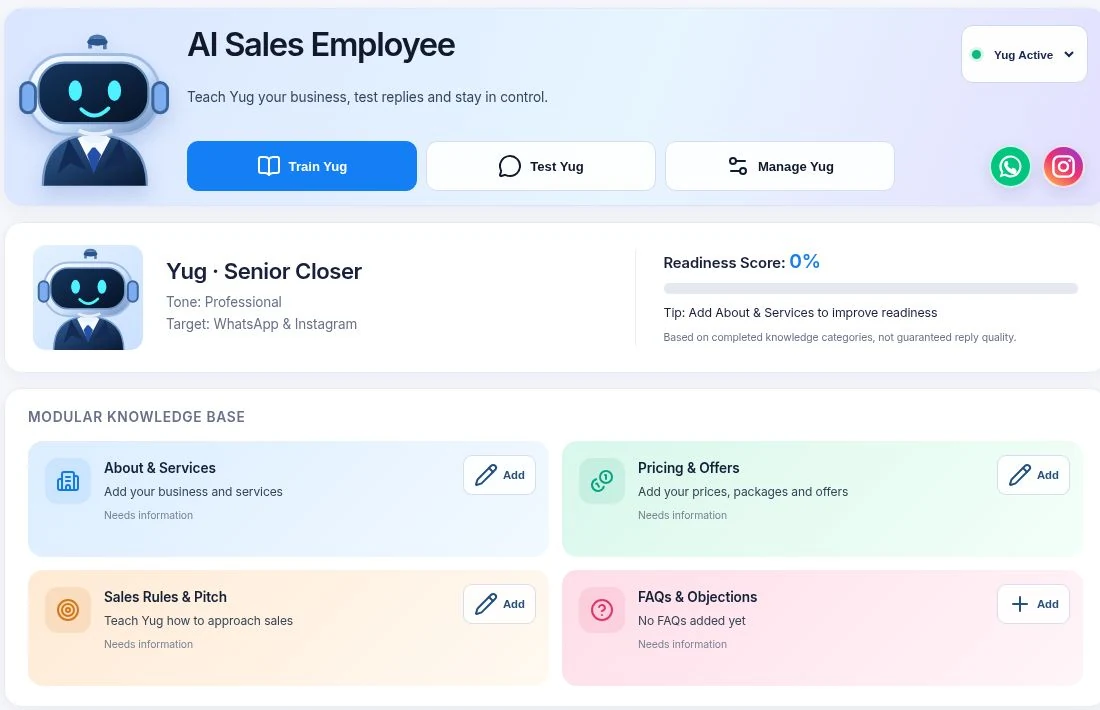
Load a small, verified sales knowledge base
Start with your top five products or services. Include the approved photos or catalogues, current price or price-range conditions, delivery or service location, key restrictions and who approves exceptions. For real estate, include property area, type and current availability. Remove stale listings before testing.
What to check: Yug can answer a real price question accurately and say 'I need to check' when the required detail is missing.
Respond to the question first, then qualify
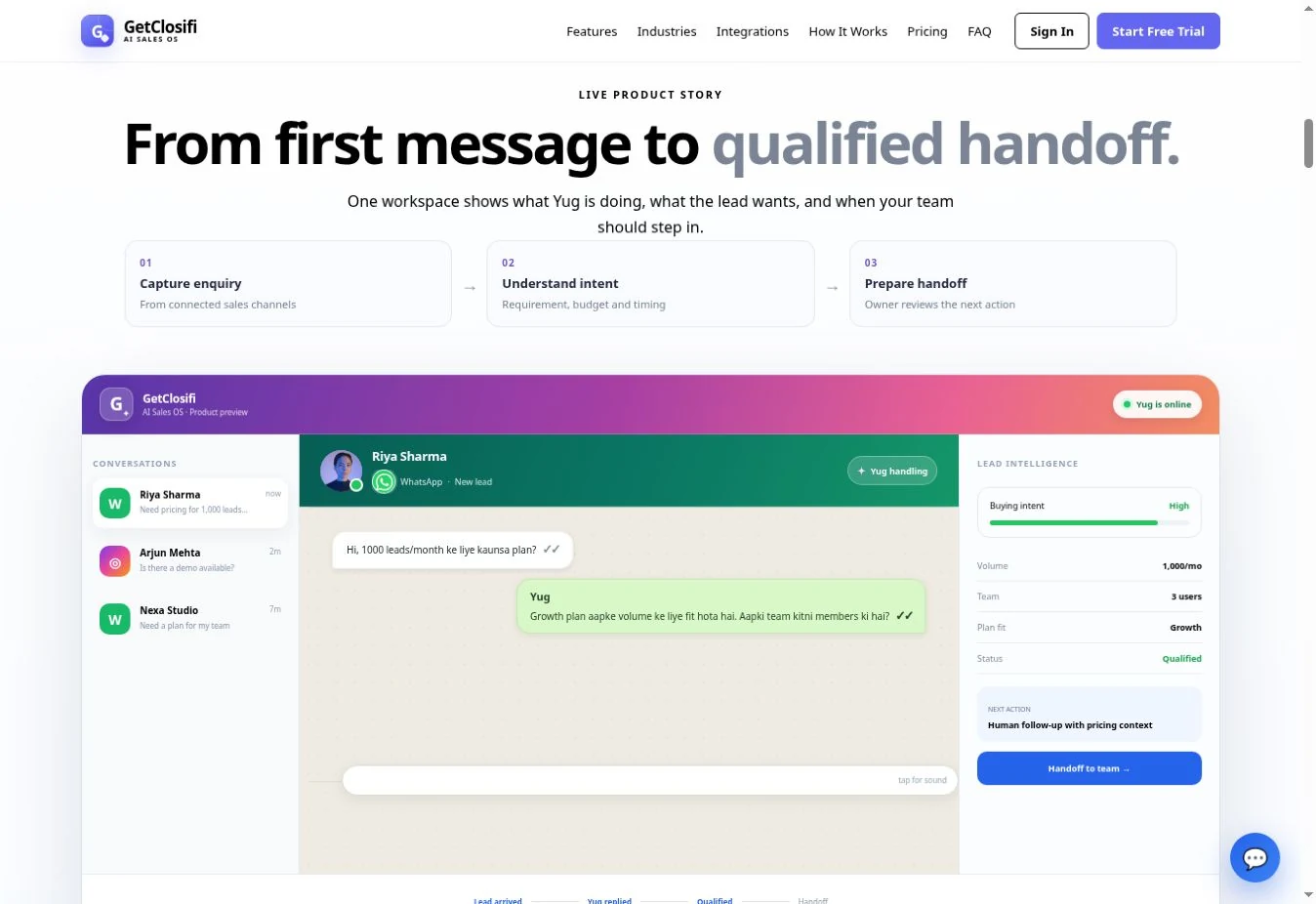
If the message is '2BHK 50 lakh tak?', acknowledge that request and ask which location matters. If the customer asks whether a plan includes a specific feature, answer from the configured plan details. Ask one qualification question at a time, use prior answers, and stop once the next action is clear.
What to check: The chat feels like a conversation: no repeated questions, invented offer or unsolicited wall of text.
Summarize the lead for a named human owner
Define what makes a lead qualified: a specific need, intent, contact path and at least one useful commercial signal such as budget, timeline or requested quote. Hand off when the customer asks for negotiation, an exception or a human. The record should show what the customer wants and the answer still owed.
What to check: The sales owner can continue the conversation with the correct context and knows whether to call, quote, share verified stock or decline.
Handle WhatsApp messaging windows and opt-outs correctly
A reply to a current inbound conversation is different from a new business-initiated message. For later follow-ups, verify opt-in and use the approved templates or contact methods required under Meta's rules. Do not promise unlimited free-form WhatsApp reminders, bulk campaigns or a guaranteed delivery time.
What to check: An old lead outside the permitted reply window is not sent an arbitrary promotional message; 'stop' requests are respected.
Test difficult cases before spending on ads
Run a test with a changed budget, missing catalogue item, customer asking for a human, duplicate inbound webhook, a paused agent and a returning customer. Confirm correct lead stages, readable history and no repeated sends. Track failures and correct the underlying integration or knowledge rather than adding more generic copy.
What to check: A repeatable pass/fail test record exists for each critical journey.
Measure outcomes that sales staff can verify
Track useful responses, leads with complete requirements, appropriate handoffs, message delivery failures and actual outcomes recorded by staff. Chat volume alone does not equal a qualified lead, and a requested site visit is not a confirmed appointment.
What to check: The owner can separate 'new chat', 'qualified lead', 'quote shared' and 'sale actually completed'.
Worked example: a WhatsApp property enquiry
Illustrative scenario for learning, not a screenshot of a real customer or proof of a measured result.
Vijay Nagar mein 2BHK flat chahiye, budget ₹45–50 lakh.
Samajh gaya—Vijay Nagar, 2BHK, ₹45–50 lakh. Ready-to-move chahiye ya under-construction bhi chalega?
Ready-to-move. Is Sunday site visit possible?
Main aapka preference note kar raha hoon: ready-to-move aur Sunday visit. Verified availability aur visit slot team se confirm karwana hoga; main bina confirmation ke slot promise nahi karunga.
Problems to check before going live
WhatsApp replies stop appearing
Check permissions, number configuration, inbound delivery and whether the correct tenant is listening. Avoid changing SEO text to fix a messaging webhook problem.
The agent sends wrong catalogue details
Remove or correct the source listing and retest; the website copy cannot repair stale inventory.
A follow-up fails after days
Check customer consent, the permitted messaging window and template requirements under Meta policy.
Official rules: WhatsApp Business Messaging Policy and WhatsApp Platform pricing. Check the applicable terms before sending campaigns or follow-ups.
Ready to test the workflow with your own business?
Prepare one accurate offer, one representative customer question and one clear human follow-up rule. Compare the actual response and handoff against these steps before paying for ads or migrating customers.
Check GetClosifi plans and current inclusions →What is WhatsApp sales automation?
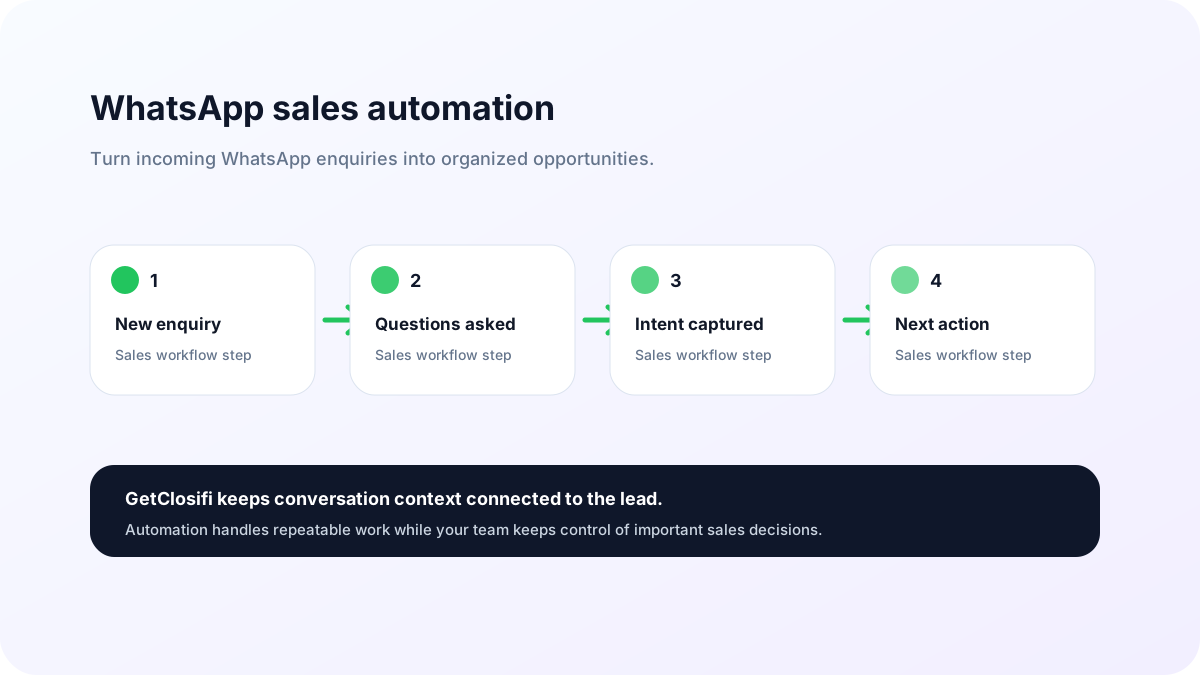
WhatsApp sales automation helps a business manage incoming customer enquiries without depending on a salesperson to manually answer every first message. It can start a conversation, collect useful information, identify buying intent and keep the lead organized so your team knows which opportunities need attention.
For many businesses, WhatsApp is where customers ask about pricing, availability, appointments, product details, quotations or demos. When those conversations stay only inside an inbox, important leads can be forgotten. GetClosifi connects the conversation with lead qualification and follow-up so WhatsApp becomes part of a repeatable sales process.
How WhatsApp automation works with GetClosifi
- Customer enquiry: a prospect sends a WhatsApp message.
- AI response: the sales agent starts a helpful conversation instead of sending a generic one-line reply.
- Qualification: the conversation can capture requirements, budget, timeline, contact details, demo interest or another buying signal.
- Lead organization: the customer is connected to a lead and sales stage.
- Follow-up: the system can surface which leads need the next action.
- Human takeover: a salesperson can continue with the context already collected.
The purpose is not to make every conversation fully automatic. The purpose is to remove repetitive work and help your team spend more time on leads that are ready for real sales attention.
Why automate WhatsApp enquiries?
Faster first response
Customers often expect quick replies on WhatsApp. Automation can help the business respond even when staff are busy, outside a sales desk or handling multiple conversations.
Consistent qualification
Different team members may ask different questions. A structured sales agent can consistently collect the information your business needs before a lead is handed over.
Better lead visibility
A message saying “price?”, “need demo” or “call me tomorrow” should not disappear in a busy chat list. GetClosifi keeps those conversations connected to lead status and follow-up context.
Less repetitive manual work
Common questions, basic qualification and lead-detail collection can be handled earlier in the conversation, allowing the human team to focus on negotiation, custom requirements and closing.
WhatsApp automation use cases
- Service businesses receiving quotation and appointment requests.
- Local businesses handling high volumes of product or availability enquiries.
- Agencies, consultants and B2B teams qualifying prospects before a sales call.
- Businesses running campaigns that generate WhatsApp conversations.
- Teams that need a consistent process for demo, meeting and follow-up requests.
Because every business has a different sales process, the most useful automation is one that understands the offer and asks questions that are relevant to the customer journey.
From WhatsApp chat to qualified opportunity
A strong sales workflow should do more than send automatic replies. It should help answer the basic question: “What should happen next with this lead?” GetClosifi combines WhatsApp conversations with an AI sales agent, lead follow-ups and the Business Copilot so the customer journey is easier to understand.
If your business also receives social enquiries, you can use Instagram DM automation alongside WhatsApp to keep multiple inbound channels connected to one sales workflow.
WhatsApp AI chatbot for sales vs a basic auto-reply
A basic WhatsApp auto-reply sends a fixed greeting or answer. A WhatsApp AI chatbot for sales should interpret the customer's enquiry, ask relevant questions, use only business-approved product or service information and preserve sales context. GetClosifi positions Yug as an AI Sales Employee for this inbound process—not as an unrestricted bulk-message sender.
For automated WhatsApp lead qualification, decide what makes a lead sales-ready: a real requirement, meaningful buying interest and a practical next action. See the WhatsApp qualification guide for the decision criteria. Any follow-up outside WhatsApp's permitted customer-service messaging window must follow Meta's applicable template and consent rules.
WhatsApp automation FAQ
Can WhatsApp automation qualify leads?
Yes. The conversation can collect useful qualification details such as requirement, budget, timeline, contact information and interest in a demo or meeting.
Can my team take over after the AI responds?
Yes. The automation can handle early-stage conversation and qualification while your team continues the conversation when human sales input is needed.
Does automation replace follow-up?
No. Good automation should support follow-up, not ignore it. GetClosifi is designed to keep next actions visible so promising conversations do not become forgotten leads.
Can WhatsApp and Instagram leads be managed together?
Yes. GetClosifi is built around keeping inbound conversations and lead context together, including WhatsApp and Instagram channels.
What should be automated on WhatsApp — and what should stay human?
WhatsApp automation is most useful for repetitive, time-sensitive work: acknowledging a new enquiry, collecting basic requirements, asking for preferred timing, capturing contact details and reminding the team that a qualified lead needs attention. These tasks are important, but they do not always require a salesperson to type the same questions repeatedly.
Complex negotiation, sensitive complaints, custom pricing and final commercial decisions should remain easy for a human to take over. The strongest workflow is not “AI or human”; it is AI handling predictable early-stage work while the sales team receives cleaner context for the moments where judgment matters.
Good automation outcome: the customer gets a fast response and your team gets a better-qualified conversation instead of another unread message in a crowded inbox.
WhatsApp sales automation software for Indian small businesses
For many small businesses in India, the sales process already happens inside WhatsApp. A customer asks for price, availability, a quotation, a demo or a callback, and the business needs to respond before that enquiry disappears under newer chats. GetClosifi adds a sales workflow around those conversations: respond, capture the requirement, identify buying intent, organize the lead stage and keep the next action visible.
If you are comparing tools, focus on whether the software can do more than send an auto-reply. Useful WhatsApp sales automation should help the team understand who needs attention next and why. See how an AI sales agent for WhatsApp and AI lead response automation fit into that workflow.
Compare WhatsApp sales tools
Need help choosing a tool? Our WATI alternative comparison explains the difference between WhatsApp campaign tools and sales-first qualification, follow-up and human handoff.
Explore related GetClosifi features
The six-stage WhatsApp sales automation workflow
A useful WhatsApp sales system must do more than say “Hello.” Sales automation connects enquiry sources with accurate answers, qualification, an owner and a next step. The design below is a playbook to evaluate software—not a guarantee that every GetClosifi integration or automation feature is already enabled.
| Stage | Automation job | Human accountability |
|---|---|---|
| 1. Source capture | Record website, ad, QR or direct incoming message where available | Confirm lead consent and source attribution |
| 2. First response | Acknowledge the question and answer from approved business information | Review fallback for unknown questions |
| 3. Qualification | Collect need, budget, location and timeline a question at a time | Define which fields are genuinely necessary |
| 4. Recommendations | Use currently published/verified products or services | Approve pricing, available stock and exceptions |
| 5. Handoff | Attach conversation summary, intent and unresolved questions | Assign a person, ownership and reply target |
| 6. Follow-up | Record the next reason/action and permitted communication method | Stop outreach when opted out; verify approval for template sends |
This division matters because a generic chatbot might send quick replies but cannot safely approve a discount, confirm a sold-out apartment or replace a real employee's judgment.
Examples: real estate, clinics and service businesses
Real estate
Enquiry: “Vijay Nagar mein 50 lakh tak ready-to-move 2BHK?” A useful AI response asks which specific area and move-in timing matters, uses published inventory only, then forwards budget, property preference and preferred site-visit window to the agent. It should not invent verified flats.
Clinic appointment enquiry
Enquiry: “Is there a consultation slot this week?” The assistant can explain published services and request a preferred time; booking must be confirmed only when real schedule availability exists. Do not collect unnecessary clinical details or offer medical diagnoses.
Interior design and painting
Enquiry: “2BHK putty aur paint karne ka kitna charge?” Ask for location, approximate area and whether material is included. Give a published price range only if the business has supplied one, then prepare the estimate request for a human contractor.
WhatsApp Business Platform rules cannot be skipped
Automation still follows Meta's messaging rules: valid opt-in where required, permitted message types, approved templates for business-initiated outreach and a meaningful human escalation path. Meta's business policy describes the customer-service window and escalation requirements; platform pricing varies by message category and destination market. Always check the current regional terms rather than assuming WhatsApp follow-ups are free or unlimited.
Failure example: A lead sent one enquiry last week. An AI cannot simply push an unrestricted free-form promotional follow-up today because your CRM has a “follow-up due” flag. The system must use the communication methods and approved templates allowed by current Meta policy and customer consent.
Technical quality also matters: verify webhook signature handling, duplicate-event prevention, idempotent message sends, delivery-status checks, rate limits, owner isolation and privacy. A convincing product demo is not evidence that these failure cases are handled in production.
What to measure: faster replies are not enough
- First meaningful response time: elapsed time before the customer receives a relevant answer, not just a greeting.
- Qualification completion: leads with the minimum verified need, budget/timing and preferred next step.
- Correct handoffs: prospect details and transcript available to the right salesperson.
- Message delivery health: successful, failed, delayed and duplicate sends by channel.
- Commercial outcomes: appointments actually confirmed, quotes accepted and paid conversions, not simply chat count.
For a one-week pilot, test new leads from both a website and a Meta ad, then purposely try an out-of-stock product, a changed budget, a paused AI employee, a media upload, an opt-out and a customer requesting a human. Review exact responses, not only the dashboard's displayed totals.
Related help: WhatsApp lead qualification, AI qualification methods, missed lead recovery.
Sources: Meta Business Policy · Meta pricing · Sales workflow guidance.
Compare WhatsApp automation software
Before choosing a WhatsApp automation platform, review our 2026 WhatsApp automation tools buyer guide for WATI, Interakt, AiSensy, respond.io and GetClosifi, including messaging charges and practical trade-offs.