Sales automation guide
What is sales automation?
Sales automation is the use of software to complete repeatable steps in a sales process with less manual effort. It can capture incoming leads, route enquiries to the right person, schedule follow-ups, update contact records, and alert a salesperson when action is needed. AI-powered systems may also interpret customer questions and suggest contextual responses.
Imagine a customer sends an Instagram message asking about a product at 9 p.m. Without a process, the message can sit in an inbox until someone notices it. With sales automation, a connected system can acknowledge the enquiry, collect the customer's requirements, record useful context and prepare a qualified lead for the business owner.
The purpose is not to guarantee a sale or replace every human conversation. It is to make routine work consistent while letting people focus on decisions that require judgment, trust and negotiation.
If you run a small team, also see our sales automation for small business guide.
How does sales automation work?
Most automations combine a trigger, conditions or logic, and an action. Modern AI tools may add interpretation of customer intent, but the workflow still needs clear rules, approved information and ownership.
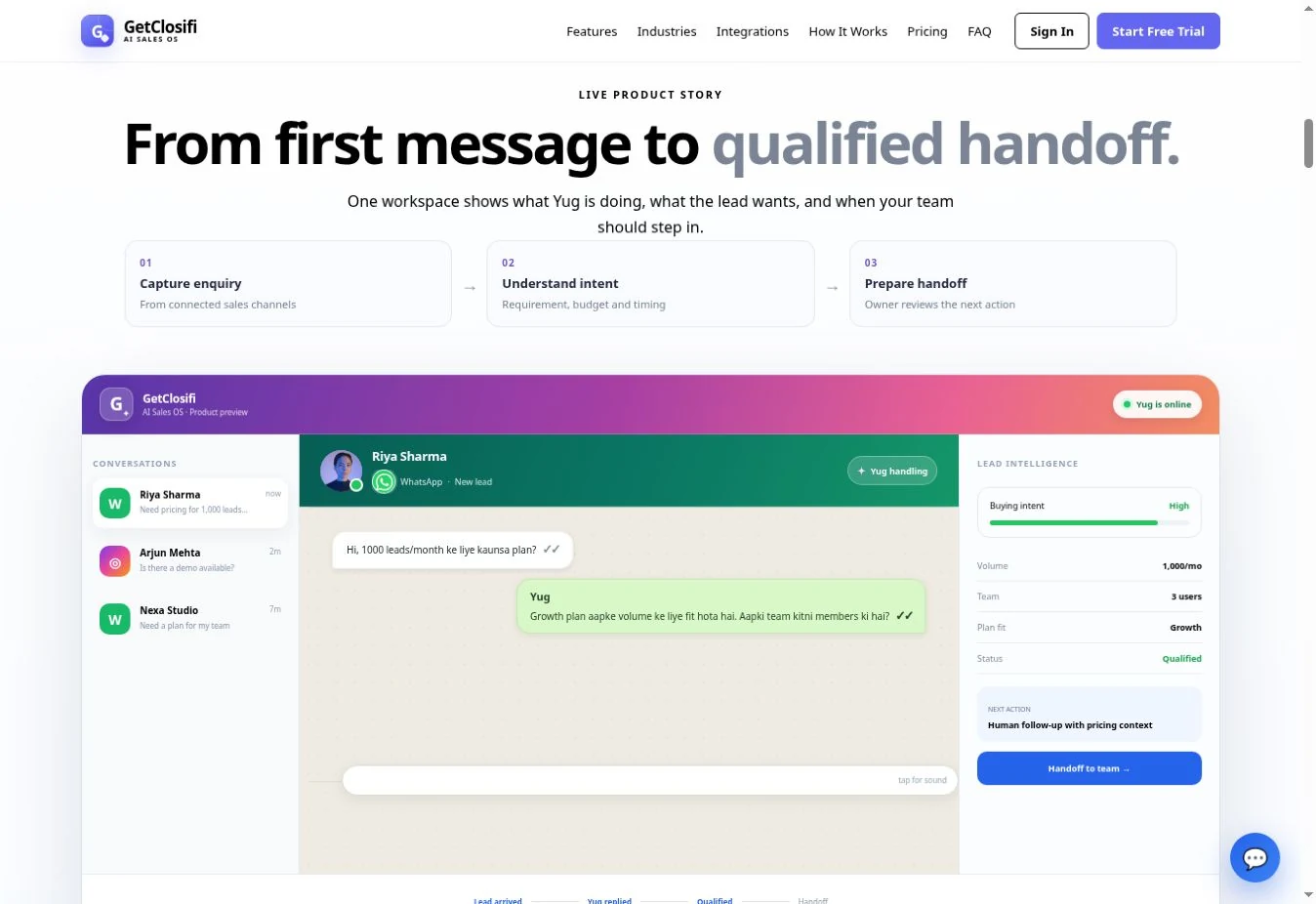
- Trigger: A contact submits a form, sends a message, books a demo or moves to a new deal stage.
- Read context: The workflow checks the channel, past conversation, customer need, relevant catalogue records and any applicable consent.
- Apply logic: Conditions route a lead by intent, urgency, availability, territory or responsible team member.
- Act: The software sends an appropriate acknowledgement, logs an enquiry, creates a task or prompts a follow-up—only where permitted.
- Hand over: A human reviews higher-stakes commitments such as custom quotes, sensitive advice, discounts and final confirmations.
This trigger–logic–outcome model is common in workflow software. For another explanation, read Zapier's sales automation guide.
7 practical benefits of sales automation
A connected workflow can acknowledge new enquiries quickly, including outside working hours.
Repeatable questions, logging and reminders reduce dependence on memory.
Capture requirement, budget, timing and intent before requesting a salesperson's attention.
Spend less time copying enquiry details into spreadsheets or CRM records.
Tasks and handoffs can make it easier to see who should respond next.
Monitor response times, incomplete qualification and follow-up stages.
Standardize early-stage sales work as enquiry volume grows, without promising a specific sales uplift.
Benefits depend on setup, data quality, channel availability and the team following through. An unmonitored automation can also create bad customer experiences.
Real-world sales automation examples
The following are illustrative workflows—not claims about a particular customer's results.
1. Real estate: qualify a property enquiry
A buyer asks about a 2BHK apartment over WhatsApp. An approved workflow checks available catalogue information, asks for location, budget and move-in timeline, then flags a suitable lead to a human agent. The agent verifies availability before committing to a property viewing. Learn about WhatsApp automation for real estate.
2. Service business: capture booking requirements
A salon or consulting business receives an Instagram DM. Automation collects preferred service and timing, then passes the request to staff. It should not promise a slot before the calendar or business owner confirms it.
3. Agency: route inbound leads
A potential client completes a website enquiry. The system records the project type, approximate budget and timeline, then creates a follow-up task for the relevant account manager.
4. E-commerce: answer product questions
When a shopper asks about a product, a connected system can surface approved catalogue information and route return-policy exceptions or order-specific disputes to a person with access.
5. CRM team: update a deal stage
When a salesperson marks an opportunity as qualified, a CRM workflow can create a call reminder, assign an owner or notify a colleague automatically.
AI sales automation vs traditional sales automation
Traditional automation follows explicit instructions such as “When a form is submitted, create a lead and notify the sales team.” AI sales automation can interpret less structured inputs—for example, identifying that a customer's message asks about pricing, location or urgency.
| Question | Traditional rules-based | AI-assisted |
|---|---|---|
| Typical input | Form fields, deal stage, predefined events | Messages, conversational context, natural language |
| Decision process | Triggers and if/then conditions | Models plus guardrails, approved business data and workflow logic |
| Example | Create a task after a lead is marked qualified | Extract a buyer's requirements from a conversation for review |
| Main risk | Rigid logic or missed edge cases | Incorrect interpretation or unsupported claims |
| Human role | Review exceptions and ownership | Verify facts, approve commitments and handle sensitive conversations |
These approaches complement each other. AI is not automatically better: predictable tasks often work best with simple rules, while conversational interpretation needs careful testing and human oversight.
AI & sales automation tools to evaluate in 2026
There is no universally “best” sales automation platform. Compare tools against your actual channels, workflow complexity, reporting needs, budget and the degree of human control you require. The summary below describes product positioning rather than a ranking.
| Tool | What it is designed for | Useful starting point |
|---|---|---|
| GetClosifi | AI-assisted inbound conversations and sales workflows around connected WhatsApp, Instagram and website channels | Small businesses handling message-based enquiries; features depend on channel connections |
| HubSpot Sales Hub | CRM-based sequences, lead rotation, follow-up tasks and workflows | Teams wanting a CRM-led prospecting and follow-up system |
| Pipedrive | Visual sales pipelines, automated deal activities and CRM workflows | Sales teams organizing pipeline stages and rep responsibilities |
| Salesforce Agentforce Sales | Broad sales-force automation with CRM records, activities and AI capabilities | Organizations with more complex CRM and sales operations |
| Zapier | Connecting apps through triggers and actions | Teams linking forms, spreadsheets, CRMs and notifications without building a custom integration from scratch |
Product capabilities may change, and advanced features can require specific plans or integrations. Verify plan details on each vendor's website before purchasing.
HubSpot Sales Hub
HubSpot describes sales automation through email sequences, lead assignment and CRM workflows. It is worth examining when your main goal is managing the full pipeline within a CRM.
Official HubSpot sales automation features ↗Pipedrive
Pipedrive focuses on workflow automation tied to leads, deals and activities—for example, creating tasks when a deal moves stages or routing work between owners.
Official Pipedrive automations ↗Salesforce Agentforce Sales
Salesforce positions Agentforce Sales around CRM-based selling, activity capture and AI tools. It suits teams evaluating more extensive sales operations requirements.
Official Salesforce product page ↗Zapier
Zapier connects triggers and actions across services. It is often a practical complement to a CRM rather than a replacement for customer records, governance or a sales process.
Official Zapier guide ↗How GetClosifi supports conversational sales automation
For businesses whose enquiries begin in WhatsApp, Instagram or a website chat, an inbox-to-lead workflow can be more urgent than a complex outbound email sequence. GetClosifi focuses on that inbound stage with Yug, the AI Sales Employee, and an owner-facing Business Copilot called Alex.
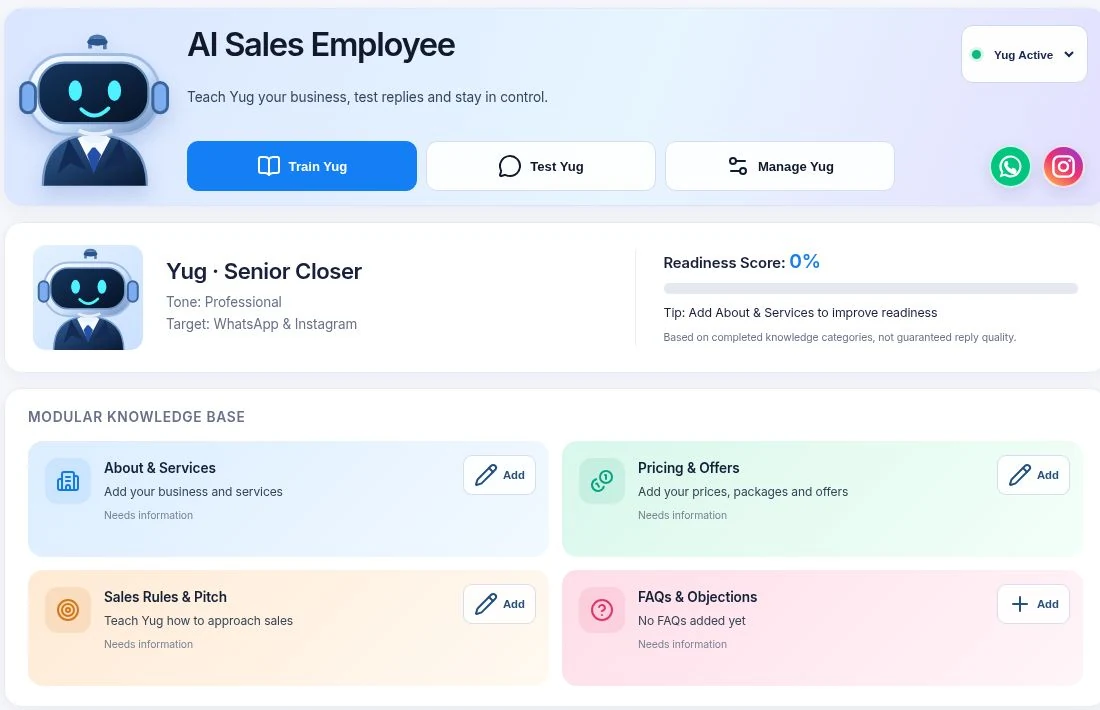
When a business authorizes and connects its own supported channels, Yug is designed to use that business's context and approved catalogue to help respond, collect customer requirements and surface useful lead information. Alex helps business owners examine conversations and plan next actions using the information available in their workspace.
Each business must connect its own accounts; GetClosifi should not imply it sends messages through a shared platform-owned WhatsApp or Instagram identity. Channel permissions, platform policies, onboarding completion and available plan features determine what works for a given customer.
Human control matters: property availability, appointments, complex pricing, special discounts and sensitive commitments should be checked or approved by the owner before finalizing them. Explore AI lead qualification, lead follow-up workflows and Instagram DM automation to see the individual steps.
Turn incoming enquiries into better-organized sales conversations
Explore GetClosifi's Yug AI Sales Employee and the workflows available to your business. Channel connections and approval settings are required for supported integrations.
Explore GetClosifi →How to start sales automation: 6 steps
- Map the customer journey. Write down how leads arrive, how the team responds and where opportunities go quiet.
- Choose one high-friction task. Begin with first enquiry handling, routing or follow-up reminders rather than trying to automate the entire funnel.
- Organize approved information. Keep product details, prices, FAQs, working hours and escalation rules accurate.
- Connect channels with permission. Use official authorization flows for WhatsApp, Instagram, websites or CRM systems, and follow the applicable platform messaging rules.
- Test realistic edge cases. Try unclear questions, unavailable products, complaints, duplicate contacts and requests that need human approval.
- Measure and adjust. Review qualified leads, first-response time and follow-up outcomes; improve the workflow before expanding it.
Metrics worth tracking
Useful metrics include median first-response time, percentage of enquiries with a complete lead record, follow-up completion rate, qualified-to-booked meeting rate, number of conversations requiring human intervention and customer complaints about inaccurate replies. Avoid treating message volume alone as success.
Frequently asked questions about sales automation
What is sales automation in simple terms?
Sales automation uses software to carry out repeatable sales tasks, such as recording an enquiry, assigning a lead, sending a routine follow-up or creating a task after a deal changes stage.
What is the difference between sales automation and a CRM?
A CRM stores and organizes customer and deal information. Sales automation takes actions using that information. Many CRMs have built-in automations, and other tools can connect multiple systems.
Can AI automate the entire sales process?
AI can help interpret messages, draft responses and identify useful lead context. Human approval is still important for sensitive commitments, unusual cases, pricing decisions and negotiations.
What should a small business automate first?
Start with one high-volume, low-risk workflow: capture new enquiries, send a helpful first response, collect the information needed to qualify a lead, then assign or flag the next human action.
Does sales automation require coding?
Not always. Many platforms provide no-code workflow builders. More complex integrations may still require setup, permissions, an API or technical assistance.
How do you measure sales automation success?
Track first-response time, the share of enquiries with usable lead details, follow-up completion, human handoff quality, booked meetings and qualified lead-to-sale conversion—rather than counting automated messages alone.
Sources and further reading
For tool-specific capabilities we consulted vendor documentation. This page is an educational guide written by GetClosifi, which is one of the products discussed above.
Next step: evaluate tools for your sales workflow
Once you have chosen a repeatable task to automate, compare products against that task. For inbound messaging, start with our WhatsApp automation tools comparison. If you already use campaign software, review WATI alternatives and switching considerations. Teams comparing two omnichannel inboxes can use respond.io vs SleekFlow.
In each trial, measure time to a useful first response, completeness of captured requirements and whether a person can take over with the right context. These checks are more useful than counting automated messages alone.